How to Use TypeSafe Jev for AP Inbox Triage (and Why Pay-or-Hold Maths Stays in Code)
Jev can sort a finance inbox and gate risky actions, but approvals need maths. In one public test Jev alone approved 42 of 100 invoices; with rules in code it was 100.
— Craig Major
Short answer: TypeSafe Jev can help sort text from an accounts payable inbox into defined queues and answer narrow safety questions. It cannot read invoice images, extract new amounts or reliably calculate totals and dates. A finance workflow needs OCR and extraction where required, deterministic checks for payment rules, and a person to approve payment and review bank-detail changes.
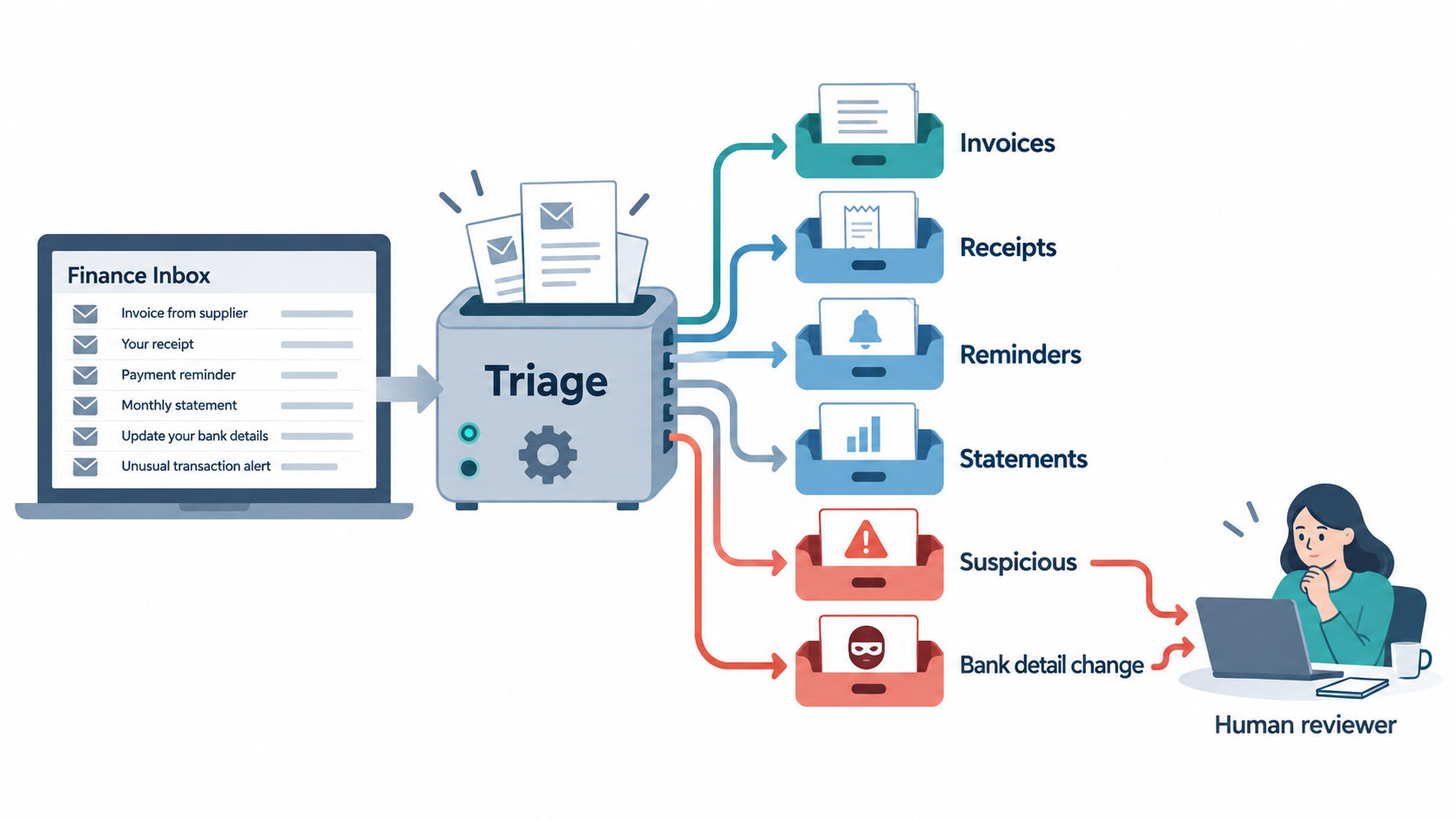
This is one decision layer within invoice processing automation. If you are comparing AP automation software, start with the whole invoice workflow, not one model call. The useful first question here is “What arrived and who should see it?” The dangerous shortcut is treating a confident classification as permission to pay.
Step 1: triage the inbox
A shared AP address receives more than invoices. It may contain receipts, reminders, statements, vendor questions, phishing attempts and requests to change bank details. Define these as separate queues, with a person handling suspicious or bank-change messages. Jev can select from the categories when the relevant text is available. The inbox and automation rules must handle empty messages, poor OCR, attachments and categories that do not fit.
For scanned attachments, convert the page to text first and use the document-classification pattern. Jev is text only; it does not open a PDF or view an image. An n8n invoice automation workflow can connect intake, OCR, classification and review, but the model should not silently decide accounting actions when a call fails or a category is unclear.
Triage should preserve the original message and source file for the reviewer. Record the category, probability, version and rule that selected the queue. A low-confidence invoice-like email can go to a review queue without disappearing from the finance team’s view. A bank-detail change should always reach a person regardless of the model’s confidence. Staff need to verify the request through a trusted process outside the message itself.
Step 2: pay-or-hold maths belongs in code
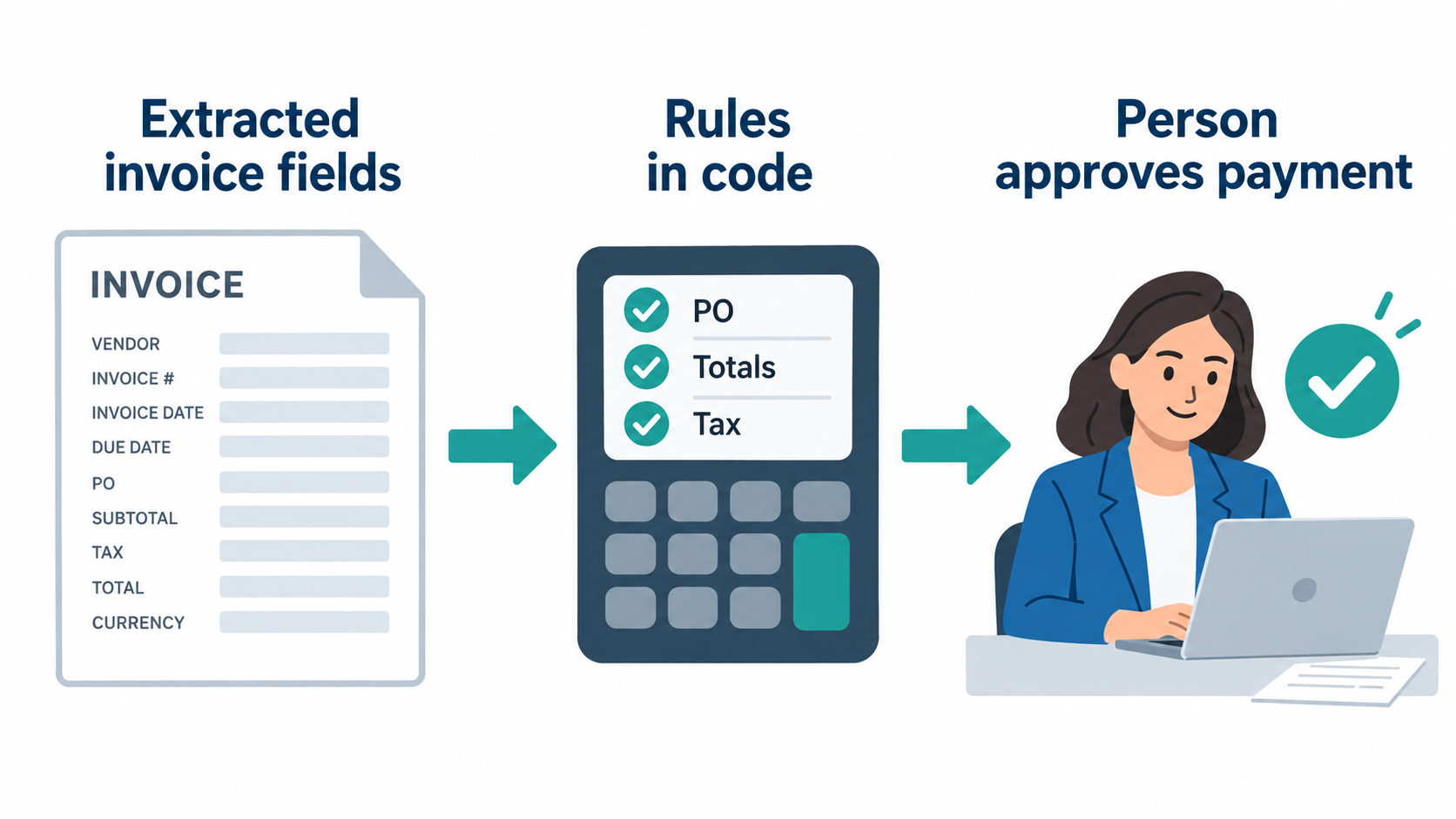
Payment eligibility can depend on purchase-order matching, totals, tax, duplicate checks and due dates. TypeSafe lists numeric precision and dates as weak areas for Jev. A decision-only model also cannot extract a new amount or invoice number as free text. Use an extraction step to obtain those fields and deterministic rules to compare them with the system of record. A person approves the payment. The invoice test pack can support a documented comparison before any live action.
A synthetic invoice test
StipePoint8’s public test used 100 synthetic invoices that the tester said should all be approved. Jev deciding the whole pay-or-hold question approved 42. In the tester’s second design, model-produced defined facts were passed to code for rule checks; they reported 100 of 100 approved at 2.1 US cents for the batch. The same post reported 97 of 100 for GPT-5.6 Terra at 23.8 cents and 97 of 100 for Claude Sonnet 5 at 37.3 cents, with batch discounts. Those are the tester’s claims on synthetic cases. They do not validate payment accuracy on a real AP ledger.
The lesson is architectural: ask narrow questions that the model can answer from text, and keep arithmetic and policy in code. Do not read “100 of 100” as proof that the combined system catches a fraudulent bank change or an unusual tax case. All invoices in that test were described as approvable; a useful live test also needs cases that must be held.
TypeSafe’s own invoice evaluation
In its invoice-payment evaluation, TypeSafe reported 61.8% agreement for Jev on the invoice workflow, its weakest of four tested workflows, against 79.1% for the best large model in that setup. This is the vendor’s own evaluation and uses its particular reference answer. It supports caution about asking Jev to decide pay-or-hold outright; it does not show how an OCR, code and human-review system performs.
A vendor-run split pipeline
Distil Labs built a two-step AP pipeline: Jev triaged the inbox, while a fine-tuned small model competed on pay-or-hold. The company reported 0.98 for its fine-tuned model versus 0.79 for Jev on that latter task. Distil Labs sells fine-tuning, and the test was vendor-run. Read the method before transferring its result to your accounts payable process. It illustrates that one model need not own both triage and payment decisions.
Jev as a safety gate
A Joule Studio sample places a Jev decision before a release_payment_block tool. Its allowed outcomes are allow, deny, review and confirm; only “allow” runs the release in the demonstration. It is a synthetic sample without a performance number. The useful design is the explicit gate and review states. In a real finance process, code and a responsible person must still define when any payment block may be released.
A safety gate should fail safely if the model cannot be reached, the input is incomplete or the answer conflicts with a hard rule. “Allow” from a model must not override a missing purchase order, a bank-detail change or a reviewer’s hold. Log the input category and rule result so the team can examine why an action was proposed.
Spend and general-ledger categories
A spend-classification guide explores defined categories for transaction text. A CPA’s QuickBooks-style test used 250 synthetic transactions and reported 215 of 250, or 86%, matching the category and review flag. Of 35 misses, the tester said 31 were over-flagged for review and two were unflagged errors. These are the CPA’s claims on synthetic data, and over-review has a different cost from silent misposting.
The right category list depends on your chart of accounts and policies. Use human examples, not a generic list, and check errors by category. A model might suggest a code, but a person and accounting rules remain responsible for posting. The QuickBooks invoice processing guide covers the surrounding workflow.
A small real-data check
A builder’s own-data report said Jev matched 11 of 11 invoices and routed 5 of 13 tickets as expected. These are tiny samples on two different tasks. They are useful as a reminder to separate results by job. They cannot establish a production accuracy rate, especially for rare but costly AP exceptions.
A first test for a Canadian finance team should include duplicate-looking documents, invoices with missing fields, credit notes, bank-change messages, French supplier text and tax lines. Measure false automatic routes as well as items sent to review. The team should decide in advance which mistakes would be unacceptable and what a reviewer needs to see.
Can I keep invoice triage in-house?
A local classifier can support an in-house sorting step for coarse email categories. It does not read an invoice image or replace OCR, extraction, code checks or payment approval. The tool in Flowgrammer’s small spot check handled English only and had limits that make it unsuitable to assume broad invoice capability. See the local-options guide for the exact scope of that check.
Keeping one sorting call on your own machines can change that step’s data path, but it does not remove privacy duties for the rest of the workflow. Email, OCR, accounting software and logs may still use other processors. Compare accuracy, upkeep and the complete data path before choosing an in-house route.
What stays human
People should approve payment, verify changes to banking information, handle disputes and investigate exceptions. The accounts payable automation guide describes the broader operating job. A reviewer needs the original invoice, extracted fields, the code checks and the proposed category; a score alone is not enough.
Design the queue so a held item has an owner and can be resolved. Record overrides and reasons. If a model sends too many routine invoices to review, the team can improve category definitions or extraction quality. Do not respond by lowering the threshold until the errors in the automatic lane have been inspected.
Canadian tax and data notes
No public Jev GST, HST or QST test was found in the September 26 research. Jev may answer a narrow text question such as “Is a QST line present?” once text has been extracted. It should not calculate a tax rate, verify a total or decide which rate applies. Use code based on the Canada Revenue Agency’s rate calculator and the accounting record, with human review where needed.
Invoices can include names, addresses, bank details and tax identifiers. Send only what a classification question needs. The reviewed Jev channels process data in the United States, with no Canadian option found; the Canadian privacy guide covers the provider and legal questions. Bank-detail changes always go to a person. This is general information, not legal advice. Check with your own lawyer about your data and your obligations.
Other ways to run this step
Trained models beat untrained Jev on some narrow pay-or-hold tests; who ran each is named in the alternatives guide. Compare full workflows, not one model’s answer, on the same labelled AP cases and review rules.
How we’re testing it
We’re running our own AP test; we’ll publish the results when the test is complete. No Flowgrammer AP result is claimed here.
FAQ
Can TypeSafe Jev process invoices?
It can help with text-based inbox triage and narrow safety questions. It cannot directly read a scanned invoice, extract a new amount or reliably perform payment arithmetic. OCR and extraction must supply usable data. Code applies matching and tax rules, and a person handles payment approval and exceptions. Judge it as one part of the process rather than an end-to-end invoice tool.
Should Jev decide whether to pay an invoice?
Not alone. In one synthetic test, a builder reported Jev approving only 42 of 100 invoices that should have passed. When defined model answers were combined with code checks, the builder reported 100 of 100 on that set. Those are their test results, not a payment guarantee. Keep arithmetic in code and payment approval with a person.
Can Jev extract invoice numbers and totals?
No. Jev selects from answers defined in advance; it does not write an invoice number or amount as new text. Use OCR and a field-extraction step, then validate the values against the source document and accounting rules. TypeSafe lists numeric precision and dates as weak areas, so a high-confidence category must not be treated as a verified total.
Can Jev check GST, HST or QST?
It can answer a narrow question about extracted text, such as whether a QST line appears. It should not choose a tax rate or calculate the amount. The cited research found no public Canadian sales-tax test with Jev. Use code and current official rates for arithmetic, with a person checking exceptions and documents whose tax treatment is unclear.
Can I keep invoice triage in-house?
A local classifier may provide an in-house sorting step for coarse inbox categories. It still needs text and does not read invoice images or approve payments. One small Flowgrammer check found an English-only tool, so do not assume French or detailed finance performance. Keeping that step local also does not settle the privacy obligations of email, OCR, accounting and review systems.
Next step
If AP intake is a funded operational problem, contact Flowgrammer about a Document Process AI Automation System that keeps payment approval with your team.