How to Use TypeSafe Jev for Document Classification (After OCR)
Jev can't read a PDF, but it can decide what a document is once the text is extracted. Public examples (including Canadian ones), thresholds and review queues.
— Craig Major
Short answer: TypeSafe Jev can choose a document type after another tool turns a scan or PDF into text. It cannot read the original PDF, extract its fields or validate its totals. A practical pipeline uses OCR, extraction, a defined classification question and a review queue for uncertain cases before anything important changes.
If you are planning the whole process, start with the document processing guide. This article focuses on one decision inside that process: what the extracted text appears to be and where a person should look next.
What Jev does in a document pipeline, and what it doesn’t
A mixed inbox can contain invoices, statements, contracts and government letters. Sorting each file is a narrow, recurring task. Jev may answer a Choice question such as “Which approved category best fits this text?” and return probabilities for the options. The workflow can then put a routine item in a queue or flag it for a person. It must still handle a file that is unreadable, mixed, unfamiliar or sensitive.
TypeSafe’s model notes describe Jev as text only. It does not perform OCR or read a PDF image. It also does not write a summary or pull a new invoice number from a page. Put OCR and field extraction before the decision call, and use code or a person to validate numbers and dates. Our broader intelligent document processing guide covers those surrounding steps.
Classification is a routing proposal, not permission to pay an invoice, discard a letter or accept a contract. Decide in advance which categories can move automatically and which must be reviewed. A bank-detail change, for instance, can be held even if the document type looks obvious. That boundary belongs in the workflow rules, not in the model’s confidence alone.
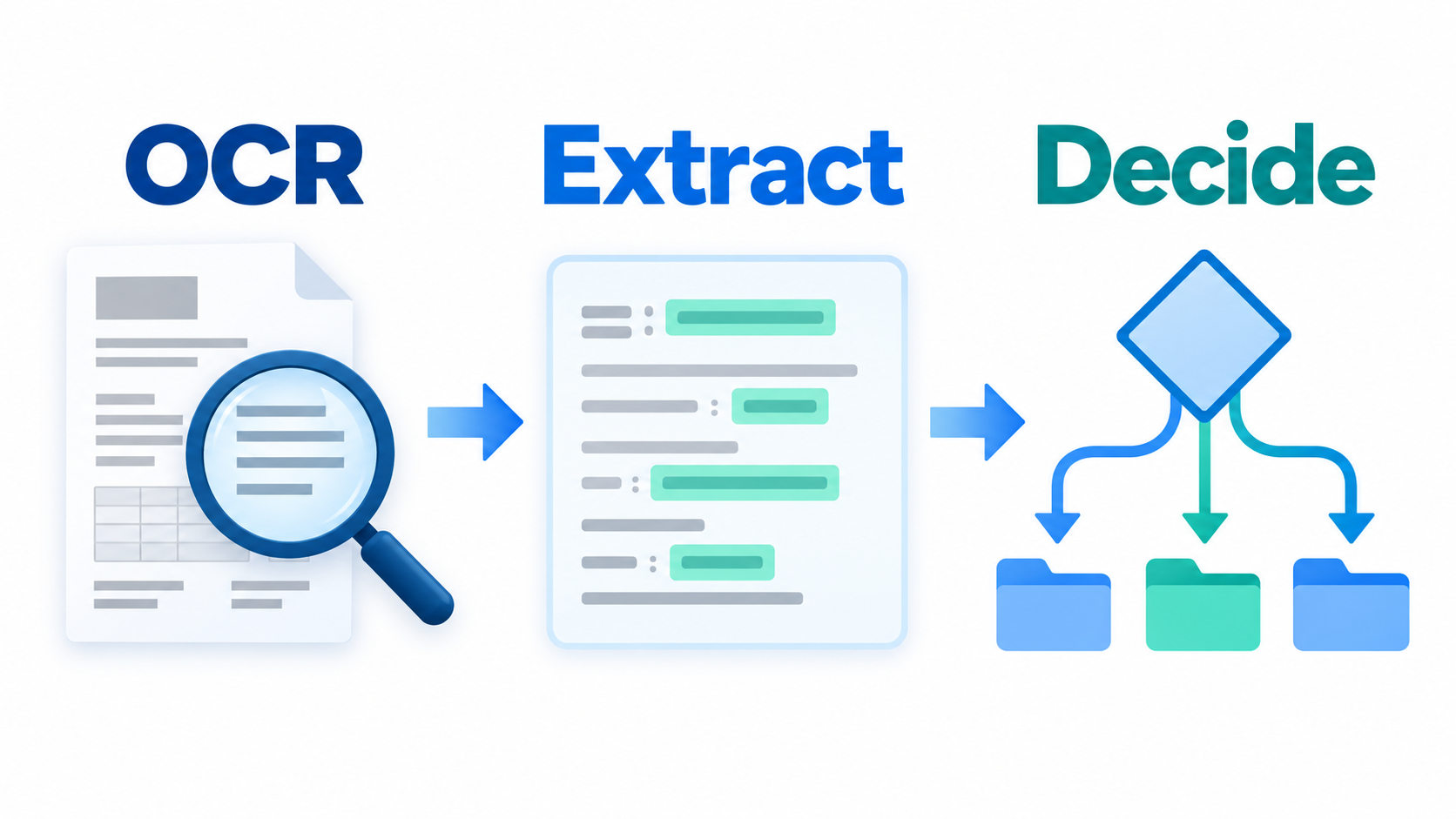
OCR → extract → decide
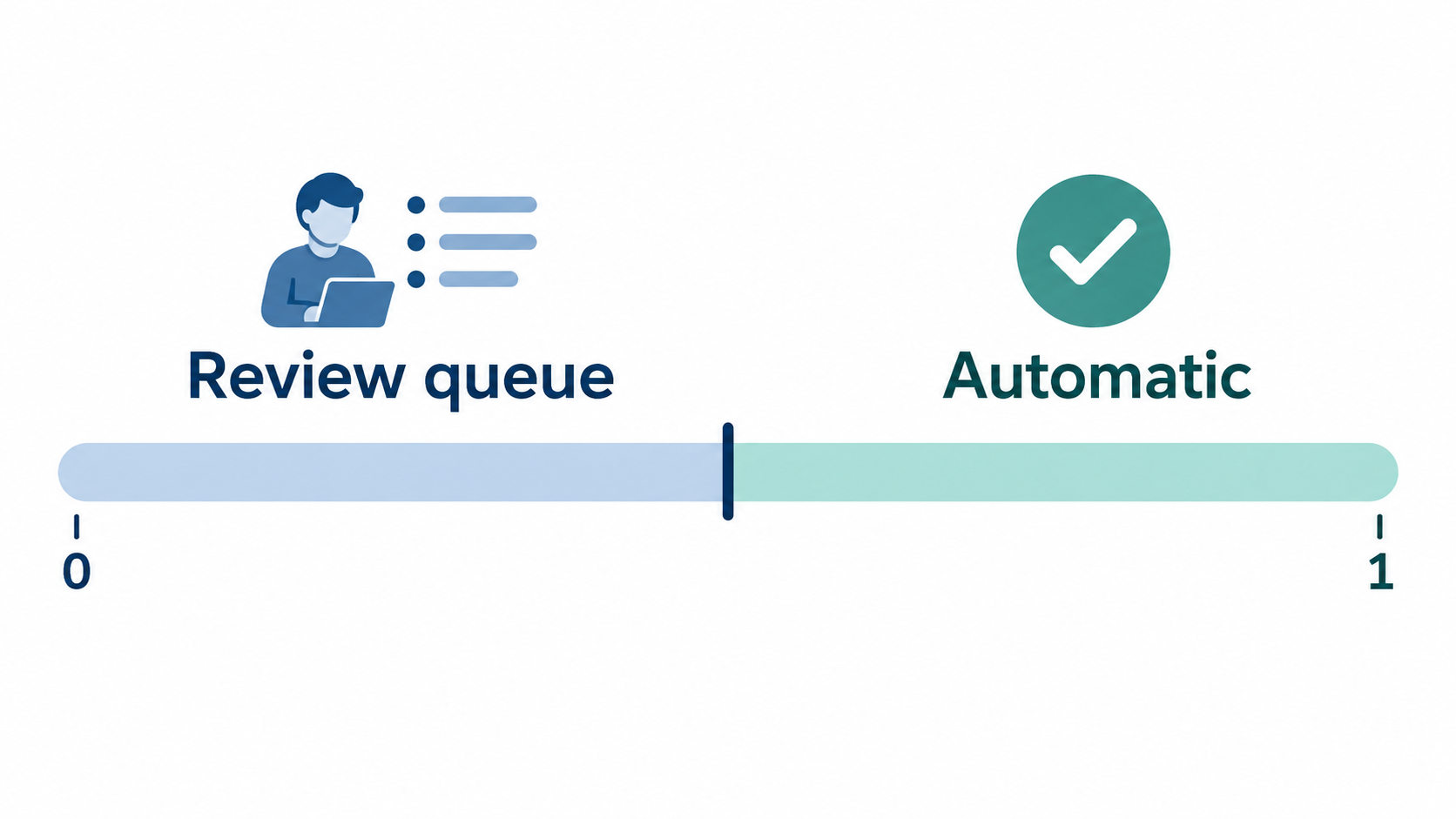
Start by receiving the file and checking that the image or PDF is usable. OCR converts a scan into text. An extraction step can identify fields needed for the business process. Jev receives only the text or state needed for a defined question. A Choice question can list up to 255 options; where a task exceeds that, TypeSafe describes a staged approach rather than one unlimited choice. The model’s answer passes through a confidence gate to an automatic lane or a human review queue.
The sequence keeps OCR and extraction separate from Jev’s classification decision. Code then checks the rules and sends the result to a routine queue or a reviewer.
The output labels should match real work. If the finance team acts differently on a vendor invoice and a customer credit note, they need distinct categories. If two labels lead to the same action, a simpler classification may be easier to maintain. Write examples of each category before using the model, including “unknown,” “multiple documents” and “needs review” paths in surrounding code.
A requirements worksheet can record the categories, downstream actions, owners and exceptions. The model should never be the only place where a consequential rule lives.
Real public examples, and what they do not prove
Loan packets split and sorted
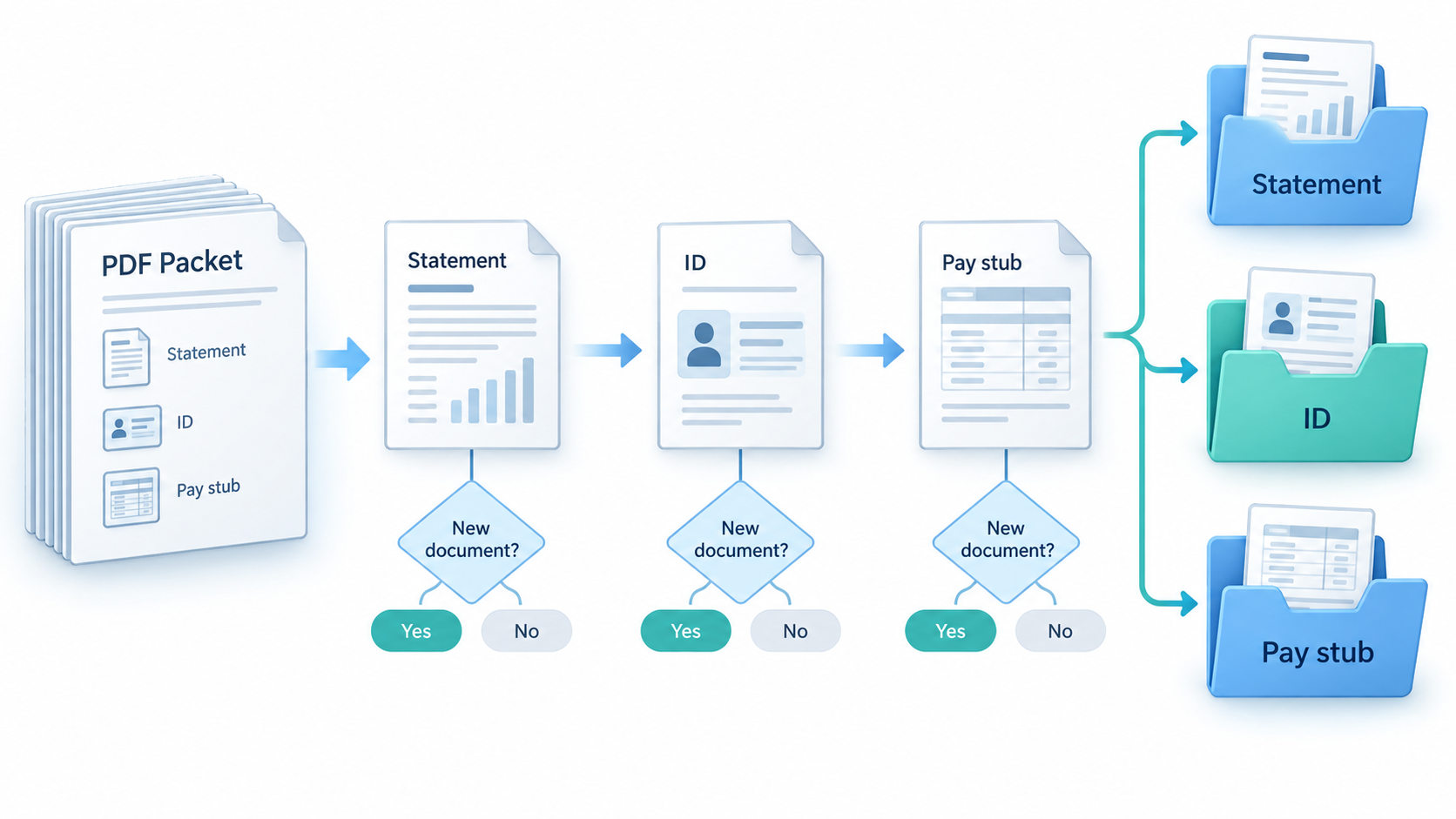
A public loan-packet builder reported 99.8% page accuracy and 100% boundary detection across 664 pages and 174 documents, at US$0.023 per package. Those are the builder’s claims on their packets. The instructive part is the change in question design: one “which type?” question stalled near 86%. A separate Yes/No question asked whether a page started a new document, followed by Choice for the type. Code applied split thresholds above 0.70 and continuation below 0.30.
In that report, all 168 documents above 0.90 confidence were correct, while the one error scored 0.67 and was flagged. This supports reviewing lower-confidence cases in that setup. It does not establish that 0.90 is a safe threshold for your files or that every new packet boundary will be found.
Canadian examples with different tasks
A Montreal builder used Jev in an open-source workflow to identify Canadian federal tax documents. The builder reported roughly one second and less than one cent per document. No accuracy figure was published in the cited material. That example shows a possible use case, not a validated result for another company’s records.
A Toronto waste-sorting test used 1,840 City of Toronto Waste Wizard items. Its authors reported 71.2% overall versus 39.5% for a keyword rule, and 94.4% among 160 items at confidence at least 0.95. The model selected “not accepted” only 8.7% of the time. This is a Canadian-rules test, not a business-document benchmark. The missed category matters as much as the headline accuracy: a workflow with uneven errors needs category-level review.
Other public builds to inspect
A tax-form classifier uses a 0.95 fallback. DocJev explores packet splitting with review flags. Another document example sends cases below 0.75 to a “Need review” folder. Mailbox.bot shows Yes/No guardrails for scanned mail. A Spanish AEAT router is a reminder to test non-English inputs rather than assume language parity.
These examples use different data, labels and costs of error. Their thresholds are design ideas to evaluate, not numbers to copy into a Canadian finance workflow.
Setting the confidence gate
Start with a labelled sample from your own documents. The research recommends 150–300 items as an initial calibration set. Include clean and poor scans, similar-looking forms, multi-document packets, French text if relevant, and categories with costly mistakes. Have a responsible person label the expected type and, where possible, mark why it matters. A document automation test pack can help organise the sample.
Run the pipeline without automatic downstream action. For each category, compare the selected label with the human label and inspect the probability on both correct and wrong answers. Then choose review bands according to the harm of a wrong route. A low-risk internal filing category may tolerate a different threshold from a payment-related message. The review-queue guide covers the operating side of that handoff.
Calibration varies. In one public test, a reported 0.85 on an offensiveness task matched human agreement only about 45% of the time; its authors said roughly 150 labelled examples corrected much of the mismatch in that setup. Other datasets were closer. A probability is useful only after you check how it behaves for the actual question and category. Recheck as document templates and senders change.
Where the pipeline goes wrong
OCR error: A missing line or jumbled table can make a correct classification impossible. Preserve the original file for a reviewer and record extraction failures separately from decision errors.
Numbers and dates: TypeSafe lists these as weak areas for Jev. Use extraction plus deterministic checks for totals, due dates, tax identifiers and cross-field comparisons. A correct document label does not validate its fields.
Irrelevant or mixed text: Long boilerplate, email chains and attachments can obscure the part that distinguishes one category. Give the model only what the question needs, and route mixed packets through a split step before document-level classification.
Adversarial text: A document can contain instructions such as “ignore previous instructions.” Treat the document as data, never as authority over the workflow. Keep allowed labels, escalation rules and payment controls in code. Review cases where the content tries to change the system’s instructions.
Building it in n8n
An n8n workflow can represent the stages: receive a file, run OCR, extract text, call the decision model, inspect the response, and route to a queue. At the September 26, 2026 check, the source review found no public end-to-end OCR → Jev → n8n document template. That is a search finding, not proof that nobody has built one; recheck before publication. The n8n document processing workflow explains the larger pattern.
The workflow should record the model identifier, input version, selected label, probability, rule outcome and reviewer correction. Keep the original file available to authorised staff. A failure to call Jev, a malformed OCR result and a low-confidence decision should reach distinct review paths so staff can tell what went wrong.
Other ways to run this step
Jev isn’t the only way to run this step. Trained classifiers and local models are compared here. Compare them using the same labelled files, category definitions, review rule and total workflow cost. A model that is cheaper per call may cost more if it sends too many cases to review.
Canadian data
Documents can contain social insurance numbers, addresses and bank details. Redact fields that the decision question does not need and send only the minimum text required. The reviewed Jev channels process data in the United States; no Canadian processing option was found. A gateway does not itself change that. Review the data path and contracts in the Canadian privacy guide. This is general information, not legal advice. Check with your own lawyer about your data and your obligations.
How we’re testing it
We’re running our own test on Canadian business documents; we’ll publish the results when the test is complete. No Flowgrammer result is available to claim here.
FAQ
Can TypeSafe Jev classify scanned documents?
Only after another step turns the scan into text. OCR reads the page; Jev can then choose a type or queue from options you define and return probabilities. The pipeline needs a review route for unreadable scans, unfamiliar forms and low-confidence answers. A document label does not validate fields or authorise a business action.
Has anyone used Jev on Canadian documents?
A Montreal builder reported using it to identify Canadian federal tax documents in an open-source workflow, with roughly one second and under one cent per document; no accuracy figure was published in the cited source. A separate Toronto waste-rules test reported classification results, but it did not use business documents. Test on your own documents before drawing a performance conclusion.
What confidence threshold should I use?
There is no universal cut-off. One public loan-packet build reported that all 168 documents above 0.90 were correct and its one error scored 0.67. Other public tests found weaker calibration on different tasks. Label a sample of your own documents, examine errors by category and set review bands according to the cost of a wrong route.
Can Jev split a multi-document PDF packet?
It can help after each page is converted to text. Ask a Yes/No question about whether the page starts a new document, then apply a split rule in code and classify the resulting sections. One builder reported finding every boundary in a 174-document set. That is their result on their packets, not a guarantee for yours.
Can Jev pull out invoice numbers or totals?
No. Jev answers defined decision questions; it does not read a PDF image or generate an extracted field as free text. Use OCR and field extraction before classification. Use deterministic checks and a person for calculations, dates and exceptions. A high-confidence “invoice” label says nothing about whether the amount or bank details are correct.
Next step
If document intake is a funded operational problem, contact Flowgrammer about a Document Process AI Automation System and the review boundary it would need.